Pro Tips
15 Video Birthday Invitation Ideas Kids Will Love (2026 Trends)
Feb 15, 2026
Video Birthday Invitation Ideas for 2026: 15+ Themes That Kids Actually Get Excited About
When Kids Watch Your Invitation Five Times, You Know You Did Something Right
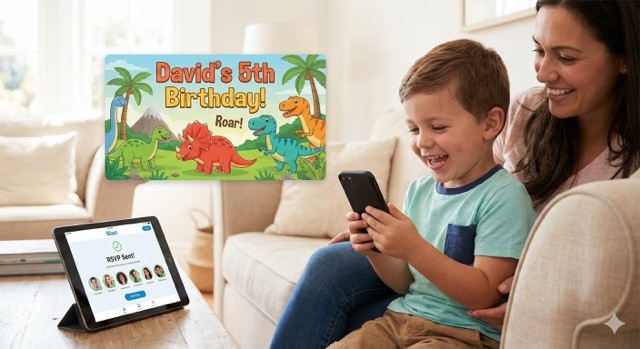
Last month, one of our customers—we'll call him David—sent out his son's 5th birthday video invitation. Dinosaur theme. Roaring sounds. His kid's face photoshopped onto a T-Rex. Nothing crazy.
Then the texts started coming in.
"My son has watched this invitation four times already."
Another parent: "Can you send it again? My daughter keeps asking to see the dinosaur birthday boy."
The invitation became entertainment. The kids weren't just informed about the party—they were pumped about it days before it even started.
Compare that to what happens with a paper invitation: it goes on the fridge, gets covered by a pizza coupon, and disappears into the black hole where all paper invitations go to die.
Why Video Invitations Are Crushing It Right Now
Let me be blunt: nobody under 35 checks their mailbox anymore.
And email? That's where birthday invitations go to be buried next to spam from pharmacies offering you a deal on multivitamins.
But video?
Kids actually want to watch them. Movement. Sound. Their friend's face on screen doing something cool. That's dopamine for a 5-year-old.
Parents share them instantly. One tap to WhatsApp. Done. Compare that to: finding stamps (do you even know where to buy stamps?), addressing 20 envelopes, driving to the post office, and waiting 5 days for USPS to maybe deliver them.
You know who's coming in real-time. No more chasing people down three days before the party asking "hey, are you coming?"
Here's a stat that'll blow your mind: 73% of parents under 35 we surveyed said they've never sent a paper birthday invitation. Not once. Paper invitations are officially a boomer move.
15+ Video Birthday Invitation Ideas (That Actually Work)
Look, I'm going to be honest with you. Some themes are timeless. Some are trendy garbage that'll be embarrassing in six months. Here's what's actually working in 2026.
For Toddlers & First Birthdays (Ages 1-3)
1. "Wild One" Safari Theme
The undisputed heavyweight champion of first birthdays. Jungle animals, safari hats, earth tones. Parents love it because it's gender-neutral and photographs like a Pinterest ad.
Pro tip: Don't go crazy with the sound effects. A gentle elephant trumpet is cute. A lion roaring at full volume will make toddlers cry.
2. "One Silly Goose" Cottagecore Aesthetic
Soft pastels, watercolor geese, gingham patterns. This exploded in 2025 and shows zero signs of slowing down.
If your Instagram feed is 80% cottagecore vibes, this is your move.
Music choice: Soft piano. Acoustic guitar. NOT dubstep.
3. Space / "First Trip Around the Sun"
Astronauts, planets, rocket ships. It's adorable, vaguely educational, and gives you an excuse to use rocket decorations.
Works for boys, girls, and everything in between.
For Preschoolers (Ages 3-5)
4. Dinosaur Roar
Every boy between ages 3 and 6 is legally required to have a dinosaur phase. It's the law.
Add roaring sound effects. Add stomping animations. Watch the RSVPs roll in.
David's actual advice: Put their kid's photo on a dinosaur body. Kids lose their minds seeing their friends as T-Rexes.
5. Unicorn Magic
Sparkles. Rainbows. Pink and purple gradients everywhere.
If your daughter talks about unicorns more than actual human beings, this is mandatory.
Engagement hack: Add a "sparkle" sound effect when the invitation opens. Like a magical shimmer. Kids eat that stuff up.
6. Princess Power
Elsa. Moana. Generic fairytale princess. Still crushing it in 2026.
Pair it with a castle backdrop and some crown graphics. You're done.
For Elementary Schoolers (Ages 6-10)
7. Superhero Squad
Marvel, DC, or make up your own superhero. Action-packed transitions work best here—comic book "POW!" effects, cape swishes, the whole deal.
If your kid has strong opinions about the MCU, let them co-design this one.
8. Video Game / Minecraft Vibes
If your kid talks about Roblox or Minecraft non-stop (and trust me, they do), lean into it.
Pixelated fonts. Block graphics. 8-bit background music. The kids' friends will actually get the references, which is the whole point.
9. Sports Star Announcement
Make it look like an ESPN player reveal. Soccer, basketball, football—whatever they're into.
Include their "stats": age, favorite food, superpower, etc. Kids think this is hilarious.
For Tweens & Teens (Ages 11+)
10. Neon Glow Party
Bright colors, electronic beats, and a "cool" factor that doesn't feel babyish. Works for boys and girls.
Reality check: If your 13-year-old rolls their eyes at the invitation, they're going to roll their eyes at the entire party. Let them design this one with you. Seriously.
11. TikTok / Social Media Aesthetic
Design it like a TikTok video. Use trending sounds (check copyright laws!), add filters, throw in some swipe-up effects.
Your teen might actually think you're cool for five seconds. Enjoy it while it lasts.
Seasonal & Year-Round Hits
12. Summer Pool Party
Waves, beach balls, palm trees, inflatable flamingos. Perfect for May-August birthdays.
13. Holiday Mashup
Birthday + Christmas? Birthday + Halloween? Lean into it. Kids born in December already have it rough—at least make the invitation fun.
14. "Around the World" Travel Theme
Planes, globes, passport stamps. Great for kids who are weirdly into geography (they exist).
15. Art Party Splash
Paint splatters, crayons, rainbow everything. Perfect for creative kids who spend more time drawing than talking.
How to Actually Make One (Without Losing Your Mind)
Here's the old way: hire someone on Fiverr for $50, wait three days, get something that's fine, realize you spelled the street name wrong, pay another $20 to fix it, wait two more days.
Or: spend two hours in iMovie trying to figure out keyframes while your kid screams in the background.
The new way? Platforms like Blast.
You:
Pick a theme (dinosaur, unicorn, space, whatever)
Upload 2-3 photos of your kid
Type in the party details (date, time, address, RSVP link)
Hit "Create"
Five minutes later, you've got a link you can text to everyone. No download. No app. No crying into your keyboard at 11pm.
And here's the part that'll blow your mind: You can see who opened it, who RSVP'd, and send updates if your kid gets sick and you have to reschedule. Try doing that with a piece of cardstock.
Common Mistakes (That I See All the Time)
❌ Making It Too Long
Kids have the attention span of a goldfish on espresso. Keep it under 30 seconds. Anything longer and they'll swipe away to watch Cocomelon.
❌ No Sound
Silent video invitations are like telling a joke with no punchline. Weird. Awkward. Forgettable.
Add music. Add sound effects. Make it fun.
❌ Sending It the Night Before
Paper invitations need 3-4 weeks of lead time because of postal service nonsense. Video invitations? You can send them 10 days out and still get full RSVPs.
But don't be that parent who sends it 24 hours before and then gets mad when people can't make it. People have calendars.
❌ Forgetting the RSVP Link
If people have to text you back to RSVP, you've already lost. Make it brain-dead easy. One click. No forms. No friction.
The Real Reason This Matters
It's not about being trendy or modern or whatever buzzword we're using this week.
It's about respecting people's time.
Nobody wants to:
Wait for snail mail
Dig through spam folders
Join a 47-person group text where everyone replies "yes" individually
Forget what time the party starts and have to ask you again
A good video invitation solves all of that. One link. All the info. Real-time updates.
But here's the part nobody talks about: it makes your kid feel special.
When their friends say "Dude, I loved your invitation!"—that confidence boost lasts way longer than the cake.
Final Thoughts: Just Start With What Your Kid Is Obsessed With
The best invitation theme isn't the trendiest one or the one that gets the most Instagram likes.
It's the one that makes your kid's eyes light up.
David's son is obsessed with dinosaurs. So they made a dinosaur invitation. Simple.
What's your kid obsessed with right now? Start there. Add some motion, some sound, throw their photo in, and you're 90% of the way to an invitation that kids will watch five times.
How to Make a Video Invitation in 5 Minutes: The 2026 Step-by-Step Guide
Ready to make your video invitation?
No credit card required. No app to download. Just your kid's best birthday yet.
FAQ (Because You're Going to Ask Anyway)
Q: How much does this actually cost?
Most video invitation platforms charge $0-5 per invitation. Paper invitations with printing and postage? $3-5 each. Video is faster and cheaper.
Q: Will my parents be able to open this?
Yes. It's just a link. They click it. That's it. If they can text, they can view a video invitation.
Q: What if I need to change something last-minute?
With paper invitations, you're screwed. With video invitations, you send an update to everyone who RSVP'd in about 30 seconds.
Q: Is this tacky?
In 2020? Maybe.
In 2026? This is the norm. Paper invitations are becoming the "formal occasions only" option.
Digital Video Invitations vs. Paper: Why You’re Losing $160+ Per Party in 2026