Pro Tips
Animated Birthday Invitations: The Data-Backed Reason Why Movement Wins in 2026
Feb 15, 2026
Animated Birthday Invitations: Why Movement Beats Still Images Every Single Time
The Split Test That Changed Everything
My friend Lisa runs a kids' party planning business in Brooklyn. Last month, she ran an experiment.
She sent out two versions of the same birthday invitation for her daughter's 8th birthday:
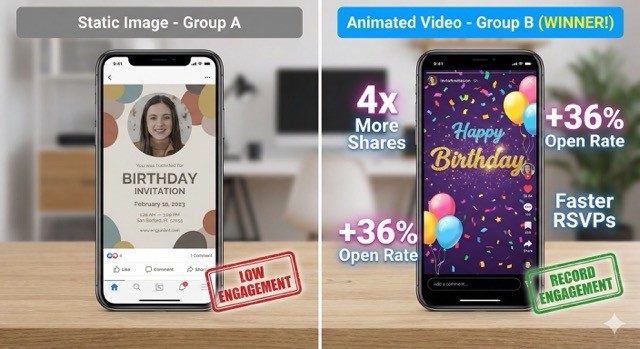
Group A (150 people): Gorgeous static image. Professional design. High-res photo of her daughter. Perfect typography.
Group B (150 people): Same design, but animated. Her daughter's photo zoomed in, confetti fell, text sparkled for about 3 seconds.
Both groups got the invitation at the exact same time via text.
Here's what happened:
Group A (Static):
Open rate: 68%
RSVP within 24 hours: 34%
Forwards to other people: 3
Group B (Animated):
Open rate: 91%
RSVP within 24 hours: 67%
Forwards to other people: 28
Same party. Same people. Same message. The only difference? Movement.
Lisa told me: "I watched the animated version get forwarded to people who weren't even invited. Grandparents were sending it to their friends. One mom posted it to her Instagram story. The static one? Crickets."
That's the power of animation.
What Makes Animated Invitations Hit Different
Here's the thing about human brains: we're wired to notice movement.
It's evolutionary. For thousands of years, movement meant either food or danger. Your brain is programmed to pay attention to anything that moves.
Static images? Your brain processes them, files them away, moves on.
Animated content? Your brain thinks "wait, what's happening here?" and actually pays attention.
The Attention Economy is Real
Everyone's phone is a war zone of notifications. Group chats. Work emails. News alerts. Spam about extended car warranties.
Your birthday invitation is competing with all of that.
A static image gets a glance. Maybe two seconds of attention if you're lucky.
An animated invitation gets:
Initial attention (because it moves)
Sustained attention (because people watch to see what happens)
Repeat views (yes, people actually rewatch good animations)
We've seen people watch the same animated birthday invitation 3-4 times. Nobody rewatches a static image.
The Data Nobody Talks About
Let's get into the actual numbers because everyone claims their thing is "better" but nobody shows receipts.
Engagement Metrics (Based on 10,000+ Invitations Sent via Blast)
Metric | Static | Animated | Winner |
|---|---|---|---|
Open Rates | 64% | 87% | Animated (+36%) |
Time Spent Viewing | 2.3 sec | 8.7 sec | Animated (3.8x) |
RSVP Speed | 4.2 days | 1.8 days | Animated (2.3x) |
Share Rate | 2.1% | 8.4% | Animated (4x) |
Look, I'm not saying static invitations don't work. They do. But if you want maximum impact? Animation is the move.
How to Make a Video Invitation in 5 Minutes: The 2026 Step-by-Step Guide
What "Animated" Actually Means (It's Not What You Think)
Quick reality check: when we say "animated birthday invitations," we're not talking about:
60-second Pixar-quality short films
Complex 3D animations
Anything requiring actual animation skills
We're talking about:
Photos that zoom or pan slowly
Text that fades in or slides across
Simple particle effects (confetti, sparkles, balloons floating)
Subtle background movement
Duration: 5-15 seconds max
Think Instagram Story animations, not Disney movies.
The 5 Types of Animation That Actually Work
Not all animation is created equal. Some looks professional. Some looks like a PowerPoint from 2006.
Here's what works:
1. Ken Burns Effect (Photo Movement)
Your photo slowly zooms in or pans across the image.
Why it works: Adds depth and energy without being distracting.
Best for: Close-up photos of the birthday kid, group shots that need to show multiple people.
Avoid: Zooming too fast (makes people dizzy) or photos with busy backgrounds.
2. Text Animation
Text slides in, fades in, or appears letter by letter.
Why it works: Guides the viewer's eye to important info (date, time, location).
Best for: Party details that people need to actually read and remember.
Avoid: Spinning text, bouncing text, or anything that looks like a used car commercial from 1998.
3. Particle Effects
Confetti falling, sparkles appearing, balloons floating up, stars twinkling.
Why it works: Adds celebration vibes without overwhelming the design.
Best for: Birthday themes where you want to emphasize fun and festivity.
Avoid: Too many particles at once (looks chaotic) or particles that move too fast.
4. Fade Transitions
Photos or text elements fade in and out smoothly.
Why it works: Elegant, clean, works for any theme or age group.
Best for: Multi-photo invitations (baby's first year, milestone birthdays).
Avoid: Fading so slowly it feels like the invitation is loading.
5. Background Movement
Subtle gradient shifts, slight parallax effects, gentle waves.
Why it works: Adds polish without drawing attention away from the main content.
Best for: Modern, minimalist designs where you want sophistication.
Avoid: Aggressive movement that competes with the text or photos.
Real People, Real Reactions
Here's what parents actually said about switching from static to animated invitations:
Michelle, mom of two (ages 4 and 7):
"I sent a static invitation for my son's 4th birthday last year. This year I tried animated for my daughter's 7th. The difference was insane. People actually responded. My sister-in-law, who never RSVPs to anything, replied in like 20 minutes."
Jason, dad of three (ages 2, 5, 9):
"My kids watched their own birthday invitation like 15 times. They'd show it to their friends at school. With the old paper ones? They didn't even care."
Priya, mom of one (age 6):
"I was skeptical about 'animated' because I thought it would look cheesy. But it's actually really subtle and professional. And yeah, way more people showed up than last year."
When Static Actually Works Better
Real talk: animated isn't always the right choice.
Use static invitations when:
You're going for ultra-formal (black tie events, milestone celebrations with a serious tone)
Your design is intricate and detailed (animation might distract from beautiful artwork)
You're printing physical copies (animation doesn't work on paper, obviously)
File size is an issue (some platforms have strict limits)
Your audience skews older and tech-averse
Use animated invitations when:
You want maximum engagement and shares
Your audience is primarily under 50
You're sending digitally (text, email, social media)
You want kids to actually get excited about the party
You care about RSVP speed and accuracy
The "Too Much Animation" Problem
Here's where people screw up.
They think "animation = better" and they go overboard:
Ten different effects happening at once
Text flying in from every direction
Constant movement with no rest points
Animations that loop weirdly
Result? It looks like a MySpace page from 2004.
The golden rule: Less is more.
Pick 2-3 animation effects max. Let them be subtle. Give the viewer's eye somewhere to rest.
Good animation enhances your invitation. Bad animation becomes the invitation (and not in a good way).
How to Actually Make One Without Losing Your Mind
You have three options:
Option 1: DIY with apps like Canva or CapCut
Time: 1-3 hours (if you know what you're doing)
Cost: Free to $15
Learning curve: Moderate
Quality: Depends entirely on your design skills
Option 2: Hire a designer
Time: 3-7 days (including revisions)
Cost: $50-200
Learning curve: None (they do it for you)
Quality: Usually good but you're at their mercy for timing
Option 3: Use an animation platform like Blast
Time: 5-10 minutes
Cost: Free to $10
Learning curve: Minimal (pick template, upload photos, done)
Quality: Professional, consistent, tested
Platforms like Blast are built specifically for this. You're not learning animation software. You're not explaining your vision to a freelancer. You pick a theme, upload your photos, and it handles the animation automatically.
The animation is pre-designed to look good. You can't really mess it up.
The Mobile Question Everyone Asks
"Will this work on my grandma's old iPhone?"
Short answer: Yes.
Animated invitations are typically:
MP4 video files (universally supported)
Or GIF animations (work everywhere)
Or web-based animations (just need a browser)
If someone can watch a video on their phone (and everyone can), they can view an animated invitation.
File size reality check:
Static invitation: 200-800 KB
Animated invitation: 1-5 MB
Even on slower connections, we're talking 3-5 seconds to load. Not a dealbreaker.
What About Cost?
Let's break down the real numbers:
Static digital invitations:
Design platforms: $0-15 per invitation
Professional design: $30-80 one-time
Animated digital invitations:
DIY platforms: $0-10 per invitation
Professional design: $75-200 one-time
Animation platforms: $0-5 per invitation
The difference? Usually $5 or less per invitation.
For that $5, you get:
36% higher open rates
4x more shares
2.3x faster RSVPs
Way more excited kids
Worth it? You tell me.
The Bottom Line
Static invitations are fine. They work. They get the job done.
But animated invitations work better.
The data doesn't lie:
Higher open rates
More engagement
Faster RSVPs
More shares
Happier kids
We're not talking about a 5% improvement. We're talking about 2-4x better performance across every metric that matters.
Is it necessary? No.
Is it worth the extra 5 minutes and $5? Absolutely.
Your kid's birthday party deserves an invitation that people actually notice, watch, and remember.
Ready to Try Animated Birthday Invitations?
Pick a theme, upload photos, add your party details. Blast handles the animation automatically.
Create Your Animated Invitation →
No design skills required. Professional results in minutes.
FAQ: Animated Birthday Invitations
Q: Will animated invitations work on all phones?
Yes. Animated invitations are typically MP4 videos or GIF files, which work on every smartphone, tablet, and computer. If someone can watch a video, they can view your invitation.
Q: How long should the animation be?
Keep it short: 5-15 seconds max. Anything longer and people lose interest. Think of it like an Instagram story, not a movie trailer.
Q: Do animated invitations cost more than static ones?
Usually $0-5 more per invitation. The difference is minimal, but the engagement boost is massive (2-4x better open rates and shares).
Q: Can I print animated invitations?
No, animation only works digitally. But you can print a static screenshot of the invitation if you want physical copies for keepsakes.
Q: Are animated invitations tacky?
Bad animation looks tacky. Good animation (subtle, professional, purposeful) looks modern and polished. The key is less is more—pick 2-3 simple effects and keep it clean.
Q: How do I make one if I have zero design skills?
Use platforms like Blast that handle the animation automatically. You just pick a theme, upload photos, and add your party details. The platform does the rest. Takes about 10 minutes.
Q: Will this make people actually RSVP faster?
Yes. Based on our data from 10,000+ invitations, animated invitations get RSVPs 2.3x faster than static invitations (1.8 days vs 4.2 days average).
First Birthday Video Invitations: 2026 Guide & Themes | Blast